Planning interventions for multiple people at the same time
As a counselor, you can easily schedule an intervention for multiple clients simultaneously.
You can do this via interventions in your healthspace. Select the intervention you would like to schedule for multiple users and click "Stage."
Then add the clients you're connected to for whom you want to schedule the intervention and click > Schedule.
See the image below:
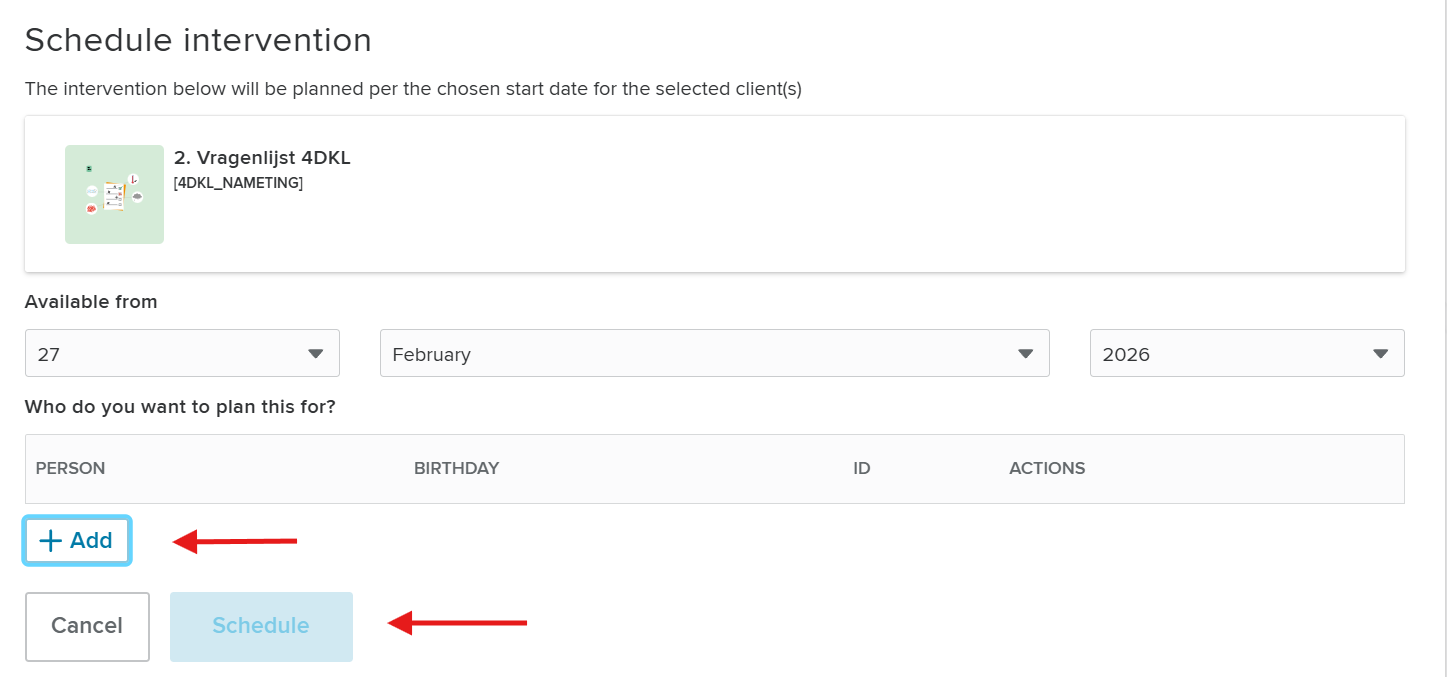
This saves you steps during group treatments and you can immediately prepare an intervention for multiple clients at the same time from the intervention catalogue.
Related Articles
Archiving interventions for counselor
As a counselor, you can enable the "archive" functionality for the client through settings. You can do this through > Manage Healthspace > Settings > Features. See the image below: Then click on archive interventions as client > enable. Now cliënts ...
Archiving interventions for cliënt
In Karify, you can archive interventions (tools). In addition to active interventions, archived interventions can also be displayed in a separate tab. An archived intervention cannot be opened. Archiving can provide clarity because of the seperate ...
Log in for the first time
When you use the app for the first time, you will be asked to set up a login code. When you've chosen your code, this will be saved for the next time you log in. Please note that you need a Karify account to use the Karify app. If you do not already ...
Is it possible to delete a module/assignment from the client record?
Planning new assignments is done in 2 phases: 1) Add modules/assignments to the staging area Add modules/assignments to the staging area by clicking the plus-icon next to the modules/assignments in the planner. In this phase, the start date of the ...
Patient connections
How do you connect with a patient in Karify? What do you do if you can’t find a patient in Karify or want to connect another clinician? This article describes creating connections in Karify. To access a patient’s record, you need to create a ...